get-dom
dom 的取得方式
getElementById
const dom = docment.getElementById('id_name')
getElementsByClass
const dom = docment.getElementsByClass('id_name')
// NodeList {0: HTMLHeadingElement}
querySelector
const btnCopy = document.querySelector('.clip-btn-copy')
querySelectorAll
const btnCopyAll = document.querySelectorAll('.clip-btn-copy')
// NodeList {0: HTMLHeadingElement}
Element 常用 function
取得 dom 之後常用的 function
getBoundingClientRect
The Element.getBoundingClientRect() method returns a DOMRect object providing information about the size of an element and its position relative to the viewport.
取回來的資料會是一個 object
{
  bottom: 290,
  height: 240,
  left: 138.5,
  right: 578.5,
  top: 50,
  width: 440,
  x: 138.5,
  y: 50,
}
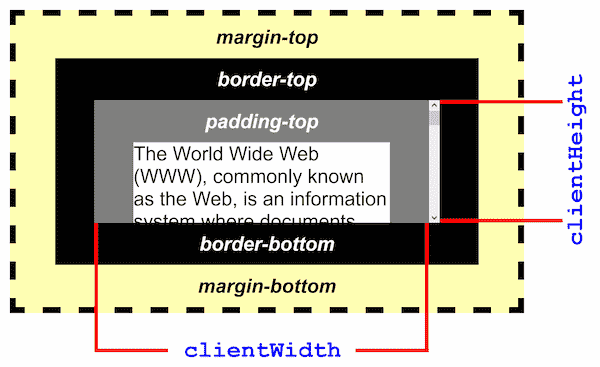
clientHeight
Note: This property will round the value to an integer. If you need a fractional value, use
element.getBoundingClientRect().
改變網頁
平常工作中,我們常常會需要截圖網頁畫面。有時候畫面上的內容不太合適,就會想要改一下數字或文字。如果會用 Photoshop,可以直接修圖;如果是做前端的,也可以用瀏覽器的開發者工具,動手改一下畫面上的文字或資料。
document.designMode = "on"; // 打開
document.designMode = "off"; // 關上