what's composables ?
Options API 與 Composition API
下面是一段官方的說明
In the context of Vue applications, a "composable" is a function that leverages Vue's Composition API to encapsulate and reuse stateful logic.
When building frontend applications, we often need to reuse logic for common tasks. For example, we may need to format dates in many places, so we extract a reusable function for that. This formatter function encapsulates stateless logic: it takes some input and immediately returns expected output. There are many libraries out there for reusing stateless logic - for example lodash and date-fns, which you may have heard of.
By contrast, stateful logic involves managing state that changes over time. A simple example would be tracking the current position of the mouse on a page. In real world scenarios, it could also be more complex logic such as touch gestures or connection status to a database.
簡單來說是用於專案中全域共用的 function, config … etc
選項式 API (Options API)
下列這段是 Vue 依據 Options API 撰寫出來的程式碼,也是 Vue 2 處理邏輯的寫法,所謂 Options (選項、可選的) 指的就是以程式碼的性質來分割程式碼,所有設定資料初始值的都會在 data 這邊處理,這個元件所需要的方法則會在 methods 這裡建立,data 及 methods 也就是使用者需要的選項。
<script>
export default {
  data() {
    return {
      count: 0,
      doubleCount: 0
    }
  },
  methods: {
    increment() {
      this.count += 1
    },
    incrementByTwo() {
      this.doubleCount += 2
    }
  }
}
</script>
組合式 API (Composition API)
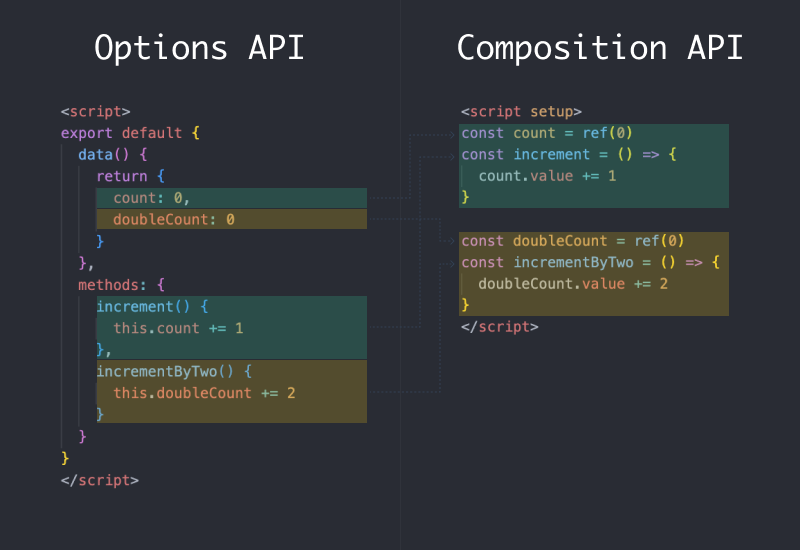
目前在 Vue 3 你仍可以繼續使用 Vue 2 的 Options API,但隨著程式碼邏輯的增加,看似有條理的分類,其實對於理解及維護上沒有想像中便利。Vue 3 提出的組合式 API (Composition API) 則是以邏輯功能來進行分類,你可以將所有與某個功能的 data、computed、methods 與 watch 等,寫在同一個段落行程一個區塊。
下圖中每種邏輯問題所需要得程式碼使用相同顏色表示,當使用 Composition API 重構後,同一個邏輯功能將會集中在同一個區塊,也使得複雜的元件能有更好的可讀性。
Mixins 與 Composables
在 Options API 可以使用 mixin 來引入可以重複使用的程式碼,讓不同的元件可以共用函數方法,但隨著專案變大,同一個元件可能使用 mixin 同時來引用許多的共用函數,這將導致容易產生命名衝突、元件間的耦合與來源不夠清晰等問題。
Vue 3 為我們帶來了組合式 API,實現了更乾淨的程式碼編排與高效的邏輯重用,組合式函數 (Composables)也基於組合式 API 來進行封裝這些可複用的邏輯,更解決了使用 mixin 實現共用函數的缺點。
組合式函數 (Composables)
在 Nuxt 3 中要建立一個組合式函數 (Composables) 我們可以在 composables 目錄下編寫,這些常用的函數,將會被 Nuxt 3 自動載入做使用,實現在各個元件使用這些函數方法。
建立組合式函數
首先,我們新增 ./composables/useCounter.js,內容如下:
export default function () {
  const count = ref(0)

  const increment = () => {
    count.value += 1
  }

  return {
    count,
    increment
  }
}
Nuxt 自動導入的特性,現在我們就能在其他元件中使用 useCounter 組合式函數。
新增 ./pages/count.vue,內容如下:
<template>
  <div class="flex flex-col items-center">
    <span class="mt-8 text-4xl text-gray-700">{{ count }}</span>
    <button
      class="my-6 rounded-sm bg-sky-600 py-2 px-4 text-base font-medium text-white hover:bg-sky-700 focus:outline-none focus:ring-2 focus:ring-sky-500 focus:ring-offset-2"
      @click="increment"
    >
      增加 1
    </button>
  </div>
</template>

<script setup>
const { count, increment } = useCounter()
</script>
Composables 組合式函數的名稱
前面範例使用的 useCounter() 是 Nuxt 3 從 ./composables/useCounter.js 自動載入的,而且 Nuxt 3 的組合式函數的名稱,有兩種方式會影響使用時的函數名稱,不過也建議在建立組合式函數可以使用 use 作為開頭來加以識別。
1. 使用預設匯出 (Default export)
如果在檔案內使用的是預設匯出,那麼這個組合式函數在使用時,即對應檔案名稱,檔案名稱可以是小寫駝峰式 (Camel case) 或烤肉串 (Kebab case),例如建立 ./composables/useCounter.js 或 ./composables/use-counter.js 檔案內容如下,使用時組合式函數為小寫駝峰式(Camel case) 名為 useCounter。
export default function () {
  const count = ref(0)

  const increment = () => {
    count.value += 1
  }

  return {
    count,
    increment
  }
}
2. 使用具名匯出 (Named export)
如果建立組合式函數時,使用的是有具名的匯出,那麼組合式函數對應的名稱,就不是檔案名稱,而是檔案內 export 出來的名稱。
例如,建立 ./composables/count.js,檔案內容如下,組合式函數名稱就不會是檔案名稱 count,而是具名導出的名稱 useCounter。
export const useCounter = () => {
  const count = ref(0)

  const increment = () => {
    count.value += 1
  }

  return {
    count,
    increment
  }
}
Composables 自動載入的規則
composables 目錄下,Nuxt 3 會自動掃描 .js, .ts 與 .vue 副檔名的檔案,但只有最上層的檔案,才會自動的被載入為組合式函數,以下面這個目錄結構為例,只有 ./composables/useCounter.js 才會被正確的自動載入。
composables/
├── time/
│   └── useDateFormat.js
└── useCounter.js
下列這種形式,./composables/time/index.js 也能正確的自動載入:
composables/
├── time/
│   └── index.js
└── useCounter.js
如果你想讓巢狀的目錄結構下也能被 Nuxt 自動掃描載入,那麼你可以使用下面兩種方法:
A. 重新匯出 [推薦]
配置 ./composables/index.js 將目錄下的函數於這裡整理並匯出你需要的作為組合式函數。
B. 配置掃描巢狀目錄
修改 nuxt.config.ts 檔案,配置自動載入額外掃描 composables 下的巢狀目錄。
export default defineNuxtConfig({
  imports: {
    dirs: [
      // 掃描 composables 目錄頂層
      'composables',
      // 掃描深度一層的特定檔案
      'composables/*/index.{ts,js,mjs,mts}',
      // 掃描整個 composables 目錄下的檔案
      'composables/**'
    ]
  }
})
參考文章
https://ithelp.ithome.com.tw/articles/10298186