RxJs 常用函式整理
RxJs 常用函式整理
過濾
take
陸續發出的值只取到所設定的次數為止,使用的情境是,只對第一個進入的資料感到興趣,只想要拿第一個訂閱的值。 和
skip是相反的的,skip是會跳過起的 n 個值開始
https://rxjs-cn.github.io/learn-rxjs-operators/operators/filtering/take.html
import { of } from "rxjs";
import { take } from "rxjs/operators";

// 發出 1,2,3,4,5
const source = of(1, 2, 3, 4, 5);
// 取第一個發出的值然後完成
const example = source.pipe(take(1));
// 輸出: 1
const subscribe = example.subscribe((val) => console.log(val));
另一個範例
this.headerService.menu$.pipe(
		filter((data) => {
				return data.applications.length > 0;
		}),
		switchMap((data: any) => {
				... // 處理資料
				return zip(...obsvArray).pipe(
						map((val) => {
								const data = val[0].data;
								data.meta = val[1].data.meta;
								if (!keyword) data.structuredData = val[1].data.structuredData;
								return {
										data: data,
								};
						}));
			}),
			take(1) // **反回第一個拿到的值**
);
skipUntil
skip
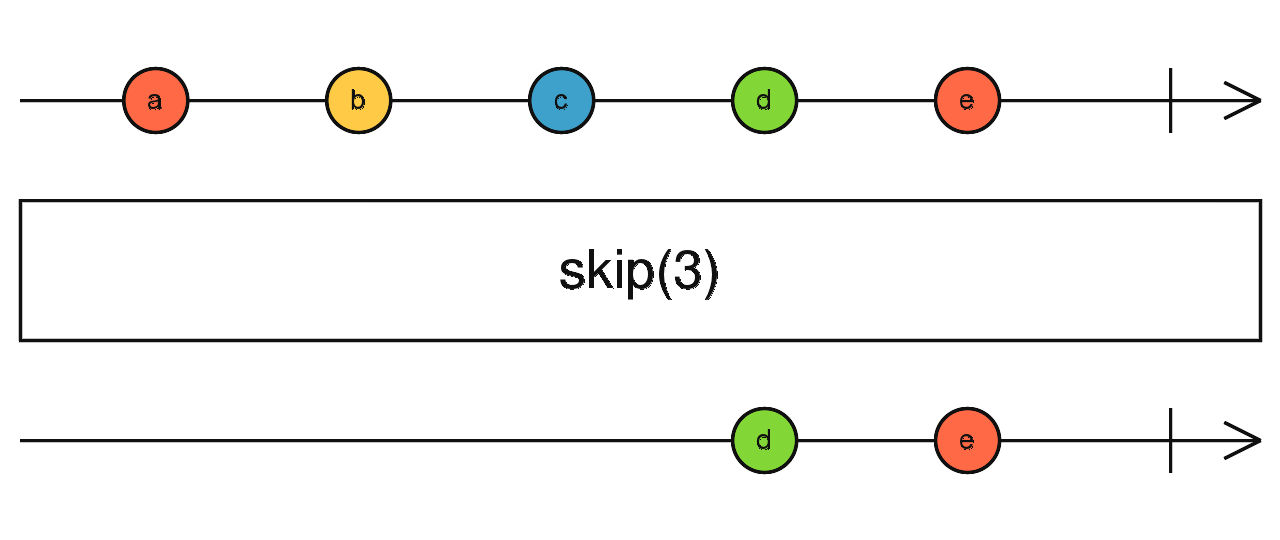
// emit every half second
const source = interval(500);
// skip the first 10 emitted values
const result = source.pipe(skip(10));

result.subscribe((value) => console.log(value));
組合
zip
會把所有內部的值全數發出後,並取得相對應的值
const obsvArray = [this.apiDashboardService.getEditQuotation(route.paramMap.get("quotation_id")), this.apiDashboardService.getQuotationDetail(route.paramMap.get("quotation_id"))];
return zip(...obsvArray).pipe(
    map((val) => {
        return {
            data: {
                meta: {
                    title: `Quotation for ${val[0].data.projectName}`,
                },
            },
            quotationGeneralData: val[0].data,
            quotationDetailData: val[1].data,
        };
    }),
    catchError((error) => {
        this.router.navigate(["/error_404"]);
        return EMPTY;
    })
);
forkJoin
// RxJS v6+
import { mergeMap } from "rxjs/operators";
import { forkJoin, of } from "rxjs";

const myPromise = (val) => new Promise((resolve) => setTimeout(() => resolve(`Promise Resolved: ${val}`), 5000));

const source = of([1, 2, 3, 4, 5]);
// 发出数组的全部5个结果
const example = source.pipe(mergeMap((q) => forkJoin(...q.map(myPromise))));
/*
  输出:
  [
   "Promise Resolved: 1",
   "Promise Resolved: 2",
   "Promise Resolved: 3",
   "Promise Resolved: 4",
   "Promise Resolved: 5"
  ]
*/
const subscribe = example.subscribe((val) => console.log(val));
轉換
map
對應每一個值去作對應的投射,有點像 js 的 map function
// RxJS v6+
import { from } from "rxjs";
import { map } from "rxjs/operators";

// 發出 (1,2,3,4,5)
const source = from([1, 2, 3, 4, 5]);
// 每個數字加10
const example = source.pipe(map((val) => val + 10));
// output: 11,12,13,14,15
const subscribe = example.subscribe((val) => console.log(val));
mapTo
範例一:將每個發出值改為字符號
// RxJS v6+
import { interval } from "rxjs";
import { mapTo } from "rxjs/operators";

// 每 2 秒發出值
const source = interval(2000);
// 將所有發出值映射為同一個值
const example = source.pipe(mapTo("HELLO WORLD!"));
// 輸出: 'HELLO WORLD!'...'HELLO WORLD!'...'HELLO WORLD!'...
const subscribe = example.subscribe((val) => console.log(val));
範例二:將點擊改為字符號
// RxJS v6+
import { fromEvent } from "rxjs";
import { mapTo } from "rxjs/operators";

// 發出每個頁面點擊
const source = fromEvent(document, "click");
// 將所有發出值映射成同一個值
const example = source.pipe(mapTo("GOODBYE WORLD!"));
// 輸出: (click)'GOODBYE WORLD!'...
const subscribe = example.subscribe((val) => console.log(val));
mergeMap
mergeMap = map + mergeAll,首先利用 map emit 出另一個 obserable, 再利用 mergeAll 將 emit 出來的多條 Observable 合併成一條 Observable,範例及 Marble Diagram 如下。
const series1$ = interval(200);
const series2$ = interval(1000);

series1$
    .pipe(
        take(3),
        map((s) => series2$.pipe(take(3))),
        mergeAll()
    )
    .subscribe((x) => console.log(x));
// 0,0,0, 1,1,1, 2,2,2
上面的範例可以改用 megeMap 運算子,效果會是一樣的 !!!
const series1$ = interval(200);
const series2$ = interval(1000);

series1$
    .pipe(
        take(3),
        mergeMap((s) => series2$.pipe(take(3)))
    )
    .subscribe((x) => console.log(x));
為了解決巢狀訂閱問題
在寫網頁的時候,時常需要呼叫多支 API,並取得結果,因此我們可能寫成如下這樣,先 call Post API,取得 post id 後,再 call Comment API,取得對應 Post 的所有 Comments,範例如下,如此即行成了巢狀訂閱。
let postApiUrl = "https://jsonplaceholder.typicode.com/posts/1";
let commentApiUrl = "https://jsonplaceholder.typicode.com/comments";

// 巢狀 Obersable
this.http.get(postApiUrl).subscribe((p: any) => {
    this.http.get(`${commentApiUrl}/${p.id}`).subscribe((c) => {
        console.log(c);
    });
});
let postApiUrl = "https://jsonplaceholder.typicode.com/posts/1";
let commentApiUrl = "https://jsonplaceholder.typicode.com/comments";

this.http
    .get(postApiUrl)
    .pipe(mergeMap((p: any) => this.http.get(`${commentApiUrl}/${p.id}`)))
    .subscribe((x) => console.log(x));
switchMap
switchMap 內是一個 project function 傳入的參數為前一個 Observable 的事件值,同時必須回傳一個 Observable;因此可以幫助我們把來源事件值換成另外一個 Observable,而 switchMap 收到這個 Observable 後會幫我們進行訂閱的動作,再把訂閱結果當作新的事件值。
switchMap 還有另外一個重點,就是「切換」(switch)的概念,當來源 Observable 有新的事件時,如果上一次轉換的 Observable 還沒完成,會退訂上一次的資料流,並改用新的 Observable 資料流,例如:
interval(3000)
    .pipe(switchMap(() => timer(0, 1000)))
    .subscribe((data) => {
        console.log(data);
    }); // 0 // 1 // 2 // 0 (新事件發生,退訂上一個 Observable) // 1 // 2 // ...

其它
tap
官方的說明
Used when you want to affect outside state with a notification without altering the notification
當你想要對外面的狀態作出改變,但是不希望影響 observer 的時候可以用 tap
tap 接收的參數和 subscribe() 很像,參數可以直接是 function 會取得 next 傳來的參數,也可以是 object,放入的是 observer({ next, error, complete }),差別在於它是 pipeable operator,如果該 observable 最終沒有被 subscribe() 的話,該 Observable 不會被執行:
範例一
const source = of(1, 2, 3, 4, 5);

source
    .pipe(
        tap((n) => {
            if (n > 3) {
                throw new TypeError(`Value ${n} is greater than 3`);
            }
        })
    )
    .subscribe({ next: console.log, error: (err) => console.log(err.message) });
另外在 RxJS 7.3.0 之後,tap 還多了幾個屬性可以使用:
subscribe:subscription 被建立時unsubscribe:subscription 被 unsubscribe 時,但收到 error 或 complete 時不會觸發finalize:subscription 結束時,不論是 unsubscribe、error 或 complete 都會觸發
import { filter, map, of, tap } from "rxjs";

of(1, 7, 3, 6, 2)
    .pipe(
        map((value) => value * 2),
        tap({
            next: (value) => console.log("tap next: ", value),
            complete: () => console.log("tap complete"),
            error: (err) => console.log("tap error", err),
        }),
        filter((value) => value > 5),
        tap({
            subscribe: () => console.log("subscription made"),
            unsubscribe: () => console.log("subscription unsubscribed"),
            finalize: () => console.log("subscription finalized"),
        })
    )
    .subscribe((value) => console.log("receive: ", value));
of & from
[ of ] => emit 一系列的值後 complete,會以一個一個參數的方式帶入資料:
import { of } from "rxjs";

//emits any number of provided values in sequence
const numbers$ = of(1, 3, 6);

const observer = {
    next: (value) => console.log(value),
    complete: () => console.log("complete"),
};

const subscription = numbers$.subscribe(observer);
如果不用 of operator,而是自己建立 observable 的話,寫起來就會像這樣:
// 等同於 const numbers$ = of(1, 3, 6);
const numbers$ =
    new Observable() <
    number >
    ((subscriber) => {
        subscriber.next(1);
        subscriber.next(3);
        subscriber.next(6);
        subscriber.complete();
    });
[ from ] => 帶入陣列作為參數,from 在帶入的參數是陣列時,它的效果和 of 的效果幾乎相同,差別只在於 from 是以一個「陣列」的方式當作參數傳入,而 of 是以多個參數的方式傳入。
import { from } from "rxjs";

// emit array as a sequence of values
const numbers$ = from([1, 3, 6]);

const observer = {
    next: (value: number) => console.log(value),
    complete: () => console.log("complete"),
};

const subscription = numbers$.subscribe(observer);
帶入 Promise 作為參數
from 也可以傳入 Promise,是直接傳入 Promise,而不是 Promise[],from 會自動把
resolve的值帶入next(),並呼叫complete- 或是把
reject的值帶入error()後終止(不會執行到complete):
import { Observable, from } from "rxjs";

const sleep = (ms: number) => new Promise() < number > ((resolve) => setTimeout(() => resolve(ms), ms));

// 直接在 from 中帶入 Promise 而不是 Promise[]
const promise$ = from(sleep(1000));

const observer = {
    next: (value) => console.log(value),
    complete: () => console.log("complete"),
};

const subscription = promise$.subscribe(observer);
finalize
const source = interval(1000);
const example = source.pipe(
    take(5), //take only the first 5 values
    finalize(() => console.log("Sequence complete")) // Execute when the observable completes
);
const subscribe = example.subscribe((val) => console.log(val));

// results:
// 0
// 1
// 2
// 3
// 4
// 'Sequence complete'