Git 常用小技巧
收錄日常開發常用的 Git 指令與情境:撿 commit、二分除錯、別名、忽略檔、子模組、分支維護(遠端/本地清理)與工作區清理。
cherry-pick
從其他分支撿單一或多個 commit 到目前分支合併。
單一 commit、直接合併:
git cherry-pick 6a498ec
撿過來但先不產生 commit(只套用變更):
git cherry-pick 6a498ec --no-commit
一次撿多個 commit(依序套用):
git cherry-pick fd23e1c 6a498ec f4f4442
Git Bisect
希望你一輩子都不要用到這個東西。Bisect 透過二分法找出是哪一個 commit 引入問題,下方 GIF 為操作示意。
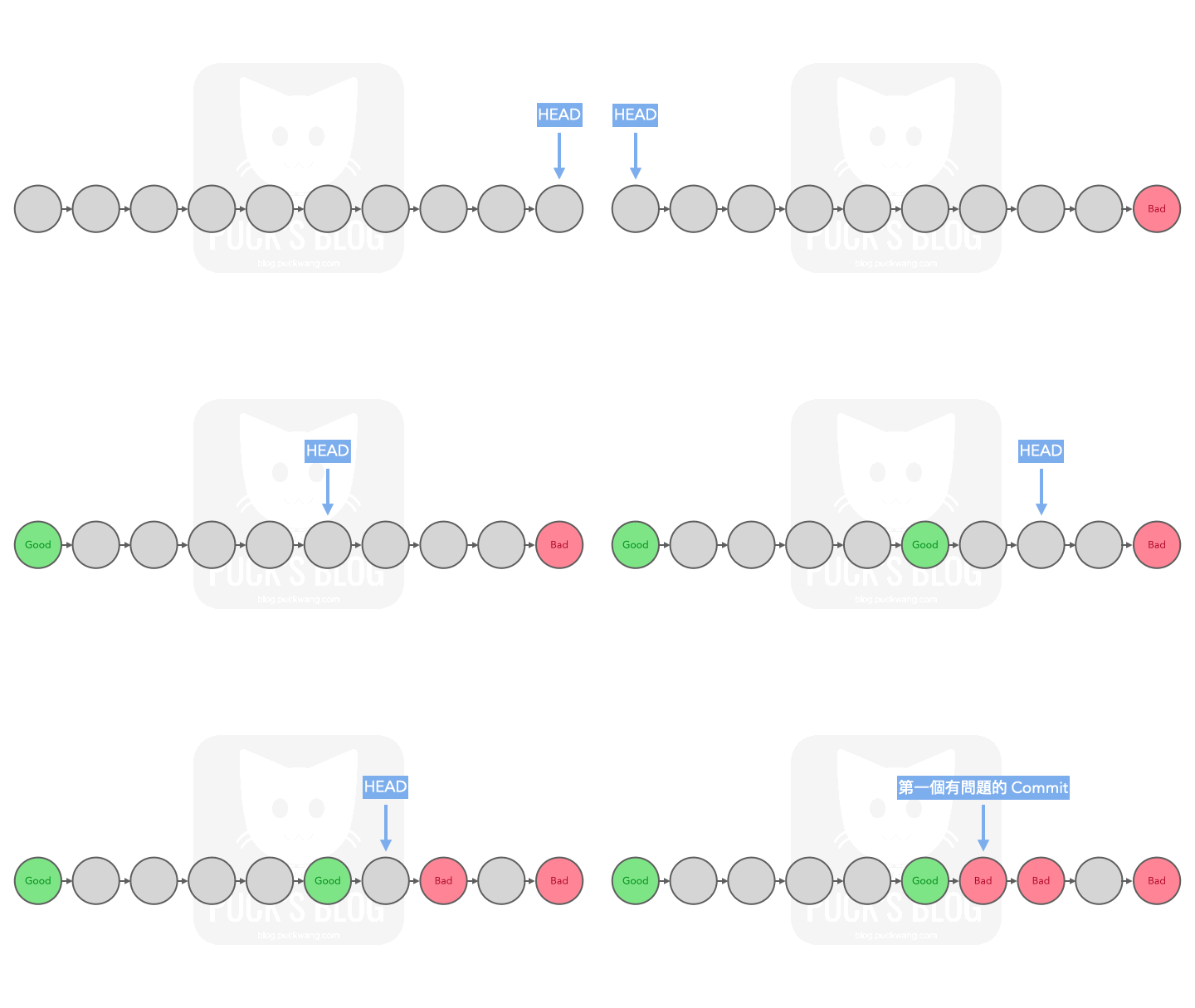
大略操作步驟
- 執行開始。
- 標記一個好的 commit 與一個壞的 commit。
- 依序標記 Git 自動切換到的 commit 是「好的」或「壞的」。
- 直到找到第一個有問題的 commit。
參考下列 command 抓出錯誤的 commit:
git bisect start
git bisect start [BAD_COMMIT] [GOOD_COMMIT] # 開始後將自動 checkout 到要檢查的 commit

# 請執行以下指令標記正常 or 錯誤
git bisect good   # 告訴 git 目前是好的
git bisect good [GOOD_COMMIT]
git bisect bad    # 告訴 git 目前是壞的
git bisect bad [BAD_COMMIT]

# 可搭配的其它指令
git bisect [help|start|bad|good|new|old|terms|skip|next|reset|visualize|view|replay|log|run]

git bisect skip      # 跳過目前版本
git bisect reset     # 停止搜尋
git bisect reset a15fd5c  # 重置到指定 commit
git bisect log       # 查看操作記錄
git bisect visualize # 視覺化檢視
Git alias
建立自己的 alias(別名),開發時會更方便。
git config --global alias.co checkout
git config --global alias.br branch
git config --global alias.ci commit
git config --global alias.st status

# 之後可用:git co -b [BRANCH_NAME] 建立新分支
以單行圖形化方式檢視所有分支的 commit 歷史(含分支與 tag 裝飾):
git config --global alias.gl "log --oneline --graph --decorate --all"
之後可用 git gl 取代較長的 git log --oneline --graph --decorate --all。
.gitignore
在專案根目錄加入 .gitignore,可避免指定檔案或目錄被納入 Git 追蹤。
# logs 目錄不納入 git
/logs

# cache 目錄不納入 git
/render_cache/*
Git Submodule
更完整的介紹與實戰心得可參考:專案中的專案:git submodule 的協作魔法與陷阱
在一個 Git 專案裡嵌入另一個 Git 專案,適合多人共用且需要一起維護的模組(協作者模式),而不是單純安裝第三方套件。
基本概念
- 主專案(superproject):你平常工作的 repo。
- 子模組(submodule):被嵌入的 repo,主專案只記錄它的 URL 與特定 commit。
- 設定檔
.gitmodules:記錄所有子模組的路徑與來源。
[submodule "SharedLibrary"]
    path = SharedLibrary
    url = https://github.com/some/shared-library.git
    branch = main
常用操作
# 新增 submodule
git submodule add https://github.com/some/shared-library.git SharedLibrary

# Clone 已經有 submodule 的專案
git clone --recurse-submodules https://github.com/my/project.git

# 已經 clone 完才想到要初始化 submodule
git submodule update --init --recursive

# 更新所有 submodule 到各自追蹤分支的最新 commit
git submodule update --remote --merge
常見坑位與建議
- 忘記初始化:新成員 clone 後要記得執行
git submodule update --init --recursive,否則子模組目錄是空的。 - Detached HEAD:在子模組目錄內工作前,先
git checkout到某個分支再開發,避免 commit 飄在沒有分支的狀態。 - 更新流程:進入子模組拉最新 → 回主專案
git add <submodule_path>→ commit 主專案,才算把新的子模組版本記錄起來。 - 建議設定:可開啟全域設定讓 pull 自動處理 submodule:
git config --global submodule.recurse true
分支維護
以常見 prefix(例如 fix/、feat/)清理遠端與本機分支。以下大多以 fix/ 為例,換成其他 prefix 即可套用。
查看遠端分支
git fetch origin
git branch -r
只看 origin 上以 fix/ 開頭的分支:
git branch -r | grep 'origin/fix/'
刪除單一遠端分支
刪除遠端 origin 上某個分支(例如 fix/login-bug):
git push origin --delete fix/login-bug
舊寫法(等價):
git push origin :fix/login-bug
刪前可先確認該分支存在:
git branch -r | grep 'origin/fix/login-bug'
批次刪除遠端 prefix 分支
注意:這會刪掉 所有
origin上符合 prefix 的分支,請先確認清單!
先看要刪除的遠端分支清單:
git fetch origin
git branch -r | grep 'origin/fix/'
確認都要刪後,再批次刪除:
git fetch origin

git branch -r | grep 'origin/fix/' \
  | sed 's# *origin/##' \
  | xargs -n 1 git push origin --delete
指令拆解:
| 步驟 | 作用 |
|---|---|
git branch -r | 列出遠端追蹤分支 |
grep 'origin/fix/' | 只留下 origin/fix/... |
sed 's# *origin/##' | 去掉前面的 origin/,剩 fix/... |
xargs -n 1 git push origin --delete | 逐個執行遠端刪除 |
清除本地已失效的遠端追蹤分支(prune)
遠端(GitLab / GitHub)上的分支已刪,但本地 git branch -r 還看得到,是因為 remote-tracking branches 尚未同步清掉。
git remote prune origin
或等價寫法:
git fetch origin --prune
再檢查:
git branch -r | grep 'origin/fix/'
批次刪除本機 prefix 分支
合併完成後可一次清掉本機對應 prefix 的分支。只影響本機,不會刪除遠端分支。
- 先切到安全分支(不要站在要刪的分支上):
git switch main # 或 develop / master,依專案慣例
- 列出本機分支,確認清單無誤:
# fix/ 開頭
git branch | grep 'fix/'

# 或 feat/ 開頭(較精準:只匹配左側清單格式)
git branch | grep '^  feat/'
- 建議先模擬,看看實際會執行哪些刪除指令:
git branch | grep '^ feat/' | xargs -n 1 echo git branch -D
- 確認輸出 OK 後,再執行真正刪除。
強制刪除(-D,即使尚未合併也會直接刪):
git branch | grep 'fix/' | xargs git branch -D
# 或
git branch | grep '^  feat/' | xargs git branch -D
僅刪除已合併到目前分支的分支(-d,較安全):
git branch | grep 'fix/' | xargs git branch -d
| 旗標 | 行為 |
|---|---|
-d | 只刪「已合併到目前分支」的分支 |
-D | 強制刪除,未合併也會刪 |
遠端還原提交
還原不正常的提交時,請使用最後一個正常運作的 commit ID(last_working_commit_id),並避免重置到不想要的 commit。
git reset --hard <last_working_commit_id>
接著將變更強制推送到遠端分支:
git push --force
其他
刪除未被追蹤的檔案與目錄:
git clean -fd