express EJS
安裝 express 專案的時候選擇 ejs ,所需要的 import 會自動引用好
view 參數導入
這是一個樣版語言,在 router 中用 res.render 的方式把資料 render 出來,ejs 上所需要資料用物件的方式往下傳遞。
/router/index.js
router.get("/", function (req, res) {
    // 在 view 的 folder 中 檔案 index.ejs render 畫面出來
    res.render("index", {
        title: "ejs courses", // 傳入資料
    });
});
/view/index.ejs
<!-- <%= title %> 用此方式把資料 render 到畫面上 -->
<html>
    <head>
        <title><%= title %></title>
        <link rel="stylesheet" href="/stylesheets/style.css" />
    </head>
    <body>
        <h1><%= title %></h1>
        <p>Welcome to <%= title %></p>
    </body>
</html>
載入內容種類
載入內容種類各種情境
<%= title %> // 字串
<%- title %> // html 格式
<% if(show){ %> // 用 bool 判斷是否有出現在資料
    <span>資料有呈現</span>
<% } %>
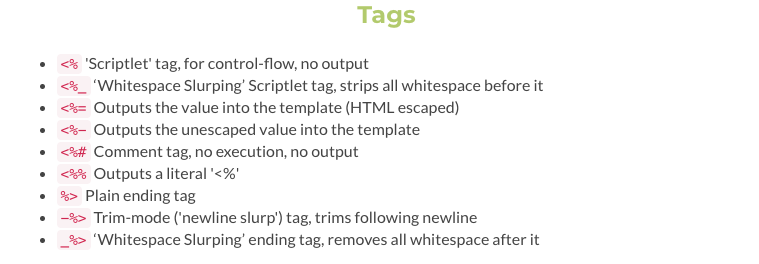
常見的 template 的引用資料的方式
載入陣列
<ul>
    <% for(let i = 0; courses.length > i; i++) { %>
    <li><%- courses[i] %></li>
    <% } %>
</ul>
設定 Layout
<!-- views/layout.ejs -->
<html lang="en">
    <head>
        <title>Document</title>
        <link rel="stylesheet" href="/stylesheets/style.css" />
    </head>
    <body>
        <%- body%>
    </body>
    <% layout('layout') %> // 引入 layout
</html>