Git 常用小技巧
收錄日常開發常用的 Git 指令與情境:撿 commit、二分除錯、別名、忽略檔、子模組與遠端還原。
cherry-pick
從其他分支撿單一或多個 commit 到目前分支合併。
單一 commit、直接合併:
git cherry-pick 6a498ec
撿過來但先不產生 commit(只套用變更):
git cherry-pick 6a498ec --no-commit
一次撿多個 commit(依序套用):
git cherry-pick fd23e1c 6a498ec f4f4442
Git Bisect
希望你一輩子都不要用到這個東西。Bisect 透過二分法找出是哪一個 commit 引入問題,下方 GIF 為操作示意。
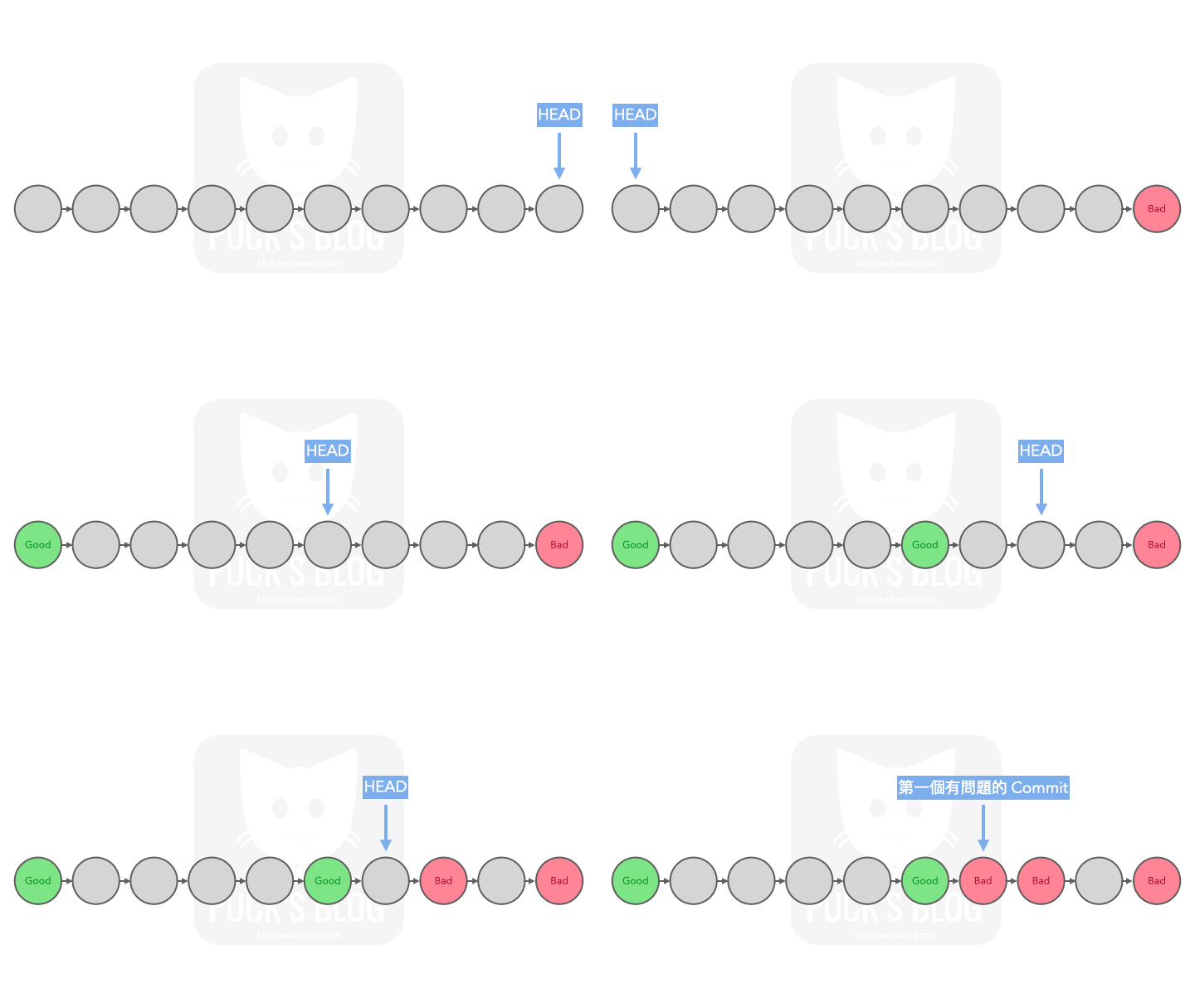
大略操作步驟
- 執行開始。
- 標記一個好的 commit 與一個壞的 commit。
- 依序標記 Git 自動切換到的 commit 是「好的」或「壞的」。
- 直到找到第一個有問題的 commit。
參考下列 command 抓出錯誤的 commit:
git bisect start
git bisect start [BAD_COMMIT] [GOOD_COMMIT] # 開始後將自動 checkout 到要檢查的 commit

# 請執行以下指令標記正常 or 錯誤
git bisect good   # 告訴 git 目前是好的
git bisect good [GOOD_COMMIT]
git bisect bad    # 告訴 git 目前是壞的
git bisect bad [BAD_COMMIT]

# 可搭配的其它指令
git bisect [help|start|bad|good|new|old|terms|skip|next|reset|visualize|view|replay|log|run]

git bisect skip      # 跳過目前版本
git bisect reset     # 停止搜尋
git bisect reset a15fd5c  # 重置到指定 commit
git bisect log       # 查看操作記錄
git bisect visualize # 視覺化檢視
Git alias
建立自己的 alias(別名),開發時會更方便。
git config --global alias.co checkout
git config --global alias.br branch
git config --global alias.ci commit
git config --global alias.st status

# 之後可用:git co -b [BRANCH_NAME] 建立新分支
以單行圖形化方式檢視所有分支的 commit 歷史(含分支與 tag 裝飾):
git config --global alias.gl "log --oneline --graph --decorate --all"
之後可用 git gl 取代較長的 git log --oneline --graph --decorate --all。
.gitignore
在專案根目錄加入 .gitignore,可避免指定檔案或目錄被納入 Git 追蹤。
# logs 目錄不納入 git
/logs

# cache 目錄不納入 git
/render_cache/*
Git Submodule
更完整的介紹與實戰心得可參考:專案中的專案:git submodule 的協作魔法與陷阱
在一個 Git 專案裡嵌入另一個 Git 專案,適合多人共用且需要一起維護的模組(協作者模式),而不是單純安裝第三方套件。
基本概念
- 主專案(superproject):你平常工作的 repo。
- 子模組(submodule):被嵌入的 repo,主專案只記錄它的 URL 與特定 commit。
- 設定檔
.gitmodules:記錄所有子模組的路徑與來源。
[submodule "SharedLibrary"]
    path = SharedLibrary
    url = https://github.com/some/shared-library.git
    branch = main
常用操作
# 新增 submodule
git submodule add https://github.com/some/shared-library.git SharedLibrary

# Clone 已經有 submodule 的專案
git clone --recurse-submodules https://github.com/my/project.git

# 已經 clone 完才想到要初始化 submodule
git submodule update --init --recursive

# 更新所有 submodule 到各自追蹤分支的最新 commit
git submodule update --remote --merge
常見坑位與建議
- 忘記初始化:新成員 clone 後要記得執行
git submodule update --init --recursive,否則子模組目錄是空的。 - Detached HEAD:在子模組目錄內工作前,先
git checkout到某個分支再開發,避免 commit 飄在沒有分支的狀態。 - 更新流程:進入子模組拉最新 → 回主專案
git add <submodule_path>→ commit 主專案,才算把新的子模組版本記錄起來。 - 建議設定:可開啟全域設定讓 pull 自動處理 submodule:
git config --global submodule.recurse true
Git 遠端刪除提交
還原不正常的提交時,請使用最後一個正常運作的 commit ID(last_working_commit_id),並避免重置到不想要的 commit。
git reset --hard <last_working_commit_id>
接著將變更強制推送到遠端分支:
git push --force
其他
刪除未被追蹤的檔案與目錄:
git clean -fd